mbedでUSBカメラと温度・湿度センサーUSBRHを同時に動くようにしてみました。
USBRHはUSB1.1(lowスピード)なのでUSBHostShellを参考にして実装する。
しかしながら、更にUSB接続のGPSモジュール(GT-730F/L)も同時に動かすと、
GPSからのNMEAデータが来なくなる時がある、原因不明。
UACHost
example2_usbrh.cpp
example3_usbgps.cpp
参考:
webカメラのプログラミングについて
---
2012年7月27日金曜日

2012年2月6日月曜日
USB温度・湿度計モジュール(USBRH)をmbedで使う

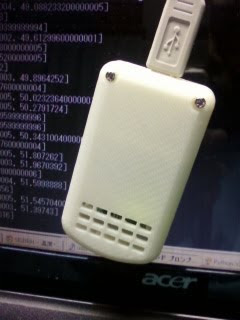
ストロベリー・リナックスの USB温度・湿度計モジュール(USBRH)をmbedで使ってみました。
USBRHからのデータを温度・湿度に変換するにはSHT11のライブラリを参考にしました。
下記のプログラムでは温度・湿度をLCDに表示、Pachubeにデータをアップロードしています。
USBHostShellに組み込んでいます。
// usbrh.cpp 2012/2/6 #include "mbed.h" #include "USBHost.h" #include "Utils.h" #include "TextLCD.h" #include "EthernetNetIf.h" #include "HTTPClient.h" #include "PachubeClient.h" #includeextern TextLCD lcd; string pachube_api_key = ""; string pachube_feedID = ""; EthernetNetIf eth; HTTPClient client; PachubeClient pachube(pachube_api_key); u8 usbrh_buf[8]; void usbrh_request(int device) { USBControlTransfer(device, HOST_TO_DEVICE|REQUEST_TYPE_CLASS|RECIPIENT_INTERFACE, 0x09, 0x0200, 0, 0, 7); } void usbrh_Callback(int device, int endpoint, int status, u8* data, int len, void* userData) { static string old_csv_data; float t, rhl, rht; unsigned short sot, sorh; float d1,d2,c1,c2,c3,t1,t2; d1 = -40,1; d2 = 0.01; c1 = -2.0468; c2 = 0.0367; c3 = -1.5955/1000000.0; t1 = 0.01; t2 = 0.00008; //printfBytes("usbrh_Callback", data ,len); sorh = data[0] << 8 | data[1]; sot = data[2] << 8 | data[3]; t = d1 + d2 * (float)sot; rhl = c1 + c2 * (float)sorh + c3 * (float)(sorh * sorh); rht = (t - 25.0) * (t1 + t2 * (float)sorh) + rhl; if (rht > 99.0) rht = 100.0; printf("temperature: %.2f, humidity: %.2f\n", t, rht); lcd.locate(0, 0); lcd.printf("t: %.2f", t); lcd.locate(0, 1); lcd.printf("h: %.2f", rht); wait(10.0); char buf[64]; sprintf(buf, "%.2f,%.2f", t, rht); string csv_data = buf; if (old_csv_data != csv_data) { old_csv_data = csv_data; pachube.PutCsv(pachube_feedID, csv_data); printf("Pachube PutCsv[%s]", buf); printf("result / response: %d / %d\n", pachube.Result(), pachube.Response()); } USBInterruptTransfer(device, 0x81, usbrh_buf, sizeof(usbrh_buf), usbrh_Callback, userData); usbrh_request(device); } int OnUsbrhInsert(int device) { printf("USBRH inserted of %d\n", device); USBInterruptTransfer(device, 0x81, usbrh_buf, sizeof(usbrh_buf), usbrh_Callback, (void*)0); usbrh_request(device); return 0; }
autoEvents.cppのOnLoadDeviceにOnUsbrhInsertを追加します。
void OnLoadDevice(int device, DeviceDescriptor* deviceDesc, InterfaceDescriptor* interfaceDesc)
{
    printf("LoadDevice %d %02X:%02X:%02X\n",device,interfaceDesc->bInterfaceClass,interfaceDesc->bInterfaceSubClass,interfaceDesc->bInterfaceProtocol);
    char s[128];
    for (int i = 1; i < 3; i++)
    {
        if (GetString(device,i,s,sizeof(s)) < 0)
            break;
        printf("%d: %s\n",i,s);
    }

    if (deviceDesc->idVendor == 0x067b && deviceDesc->idProduct == 0x2303) {
        OnPL2303Insert(device);
        return;
    }

    if (deviceDesc->idVendor == 0x04bb && deviceDesc->idProduct == 0x0f04) {
        OnEcoboxInsert(device);
        return;
    }

    if (deviceDesc->idVendor == 0x1774 && deviceDesc->idProduct == 0x1001) {
        OnUsbrhInsert(device);
        return;
    }
---
2011年11月29日火曜日
USB温度・湿度計モジュール(USBRH)をPythonで使う
# -*- coding: utf-8 -*-
# usbrh.py 2011.11.29
import ctypes

class usbrh:
    def __init__(self):
        # USBMeter.dllの読み込み
        self.dll = ctypes.windll.LoadLibrary('USBMeter')
        self.dev = self.FindUSB()

    def GetVers(self): # ファームウェアバージョンの取得
        f = getattr(self.dll, "_GetVers@4")
        f.restype = ctypes.c_char_p
        f.argtypes = [ctypes.c_char_p]
        return f(self.dev)

    def FindUSB(self, index = 0): # モジュールの検索
        self.index = ctypes.c_int(index)
        f = getattr(self.dll, "_FindUSB@4")
        f.restype = ctypes.c_char_p
        f.argtypes = [ctypes.c_void_p]
        return f(ctypes.byref(self.index))

    def GetTempHumidTrue(self): # 温度・湿度の取得
        temp = ctypes.c_double()
        humid = ctypes.c_double()
        f = getattr(self.dll, "_GetTempHumidTrue@12")
        f.argtypes = [ctypes.c_char_p, ctypes.c_void_p, ctypes.c_void_p]
        r = f(self.dev, ctypes.byref(temp), ctypes.byref(humid))
        if r == 0:
            return [temp.value, humid.value]
        return None

    def ControlIO(self, port, val): # LEDの制御
        f = getattr(self.dll, "_ControlIO@12")
        f.argtypes = [ctypes.c_char_p, ctypes.c_int, ctypes.c_int]
        return f(self.dev, port, val)

if __name__ == '__main__':
    import time
    rh = usbrh()
    print "FindUSB [%s]" % rh.dev
    print "GetVers [%s]" % rh.GetVers()
    n = 0
    while 1:
        print rh.GetTempHumidTrue()
        rh.ControlIO(n & 1, n & 2)
        n += 1
        time.sleep(10)
登録:
コメント (Atom)